Quick Facts
- Category: Cybersecurity
- Published: 2026-05-05 00:13:28
- Securing Your Software Pipeline: A Step-by-Step Defense Against CI/CD Attacks
- LayerZero's Kelp DAO Exploit Response: Key Questions on the Single-Verifier Security Flaw
- Rising Fabricated Citations and the Graying of Medical Research: An Alarming Collision
- A Heartfelt Thank You: Reflections on Community, Loss, and the Future of AI
- Target's Q1 Earnings Surge Signals Potential Turnaround Amid Ongoing Boycott
For years, organizations with heavy Windows footprints have struggled with a twin dilemma: static, long-lived credentials and overly permissive network access. Despite advances in security tools, many still hand out shared admin passwords and rely on VPNs that treat users as network citizens rather than verified identities. This article unpacks ten critical insights into how HashiCorp Boundary and Vault together solve these problems—moving from a model of broad access and static secrets to one of dynamic, identity-based control. Whether you’re a CISO, DevOps engineer, or security architect, these points will help you rethink remote access and credential hygiene.
1. The Static Credential Problem Is Still Alive
Many Windows environments continue to depend on credentials that never change. Shared local administrator accounts, service accounts with fixed passwords, and manually provisioned privileged logins are commonplace. These credentials are often reused across sessions and rarely rotated—sometimes staying valid for months or years. This static model creates a massive attack surface. If an attacker steals one credential, they can move laterally, escalate privileges, and maintain persistence. Multi-factor authentication helps at login, but it doesn’t fix the underlying issue of a password that can be reused elsewhere. The result is a hidden risk that security teams often underestimate.
2. Shared Admin Accounts Widen the Blast Radius
In many organizations, shared administrative accounts for Remote Desktop Protocol (RDP) access, troubleshooting, and emergency break-glass scenarios are the norm. These accounts are passed around by word of mouth or stored in unencrypted spreadsheets. When multiple users share a single credential, auditing individual actions becomes nearly impossible. If that credential is compromised, every resource accessible with it is at risk. The blast radius is enormous. Replacing shared accounts with individual, ephemeral credentials is a fundamental step in reducing exposure—but manual rotation is impractical at scale, which is where automation comes into play.
3. Manual Rotation Is a Burden That Fails
Security policies often mandate regular password changes, but manual rotation is error-prone and expensive. IT teams juggle hundreds of servers, service accounts, and application passwords. The natural tendency is to postpone rotations, especially when they require coordination across teams or system reboots. As a result, credentials linger far beyond their intended lifetime. Automated secrets management—like HashiCorp Vault’s dynamic secrets—eliminates this burden. Instead of static passwords, Vault generates short-lived, on-demand credentials that expire automatically. This approach not only reduces risk but also frees up operational overhead.
4. VPNs Solve Connectivity, Not Access Control
Traditional VPNs grant users a connection to the network, but they don’t control what each user can do once inside. Once authenticated, users often have broad subnet access, enabling lateral movement. Attackers who compromise a VPN session can browse the internal network, looking for vulnerable targets. VPNs were designed for an era when the network perimeter was well-defined. Today, cloud, hybrid, and remote work environments have blurred those boundaries. Relying on a VPN as the primary access control is like giving everyone a key to the building and hoping they stay in the lobby.
5. IP-Based Rules Are Brittle in Dynamic Environments
Firewalls, security groups, and network segmentation typically base access decisions on IP addresses. But in modern environments, IP addresses are dynamic—cloud instances spin up and down, containers change addresses, and users roam across locations. Maintaining accurate IP-based rules becomes a nightmare; one misconfiguration can open a hole or block legitimate access. More importantly, IP rules don’t verify user identity. A compromised machine with a trusted IP can still access sensitive resources. Identity-based access control, which ties permissions to the authenticated user rather than a network address, is far more resilient and easier to manage.
6. The Better Model: Identity-Centric Access
HashiCorp Boundary flips the traditional model: instead of granting network-level access, it provides direct, identity-based access between a user and a specific target resource. Boundary authenticates the user, then authorizes them to connect to, say, a particular Windows server—without ever giving them a network foothold. This eliminates the risk of lateral movement. Combined with Vault for credential management, the user never sees a static password; Boundary retrieves a temporary credential on their behalf. The result is a zero-trust approach where access is explicitly granted, just-in-time, and fully auditable.
7. Boundary Handles Credentials Transparently
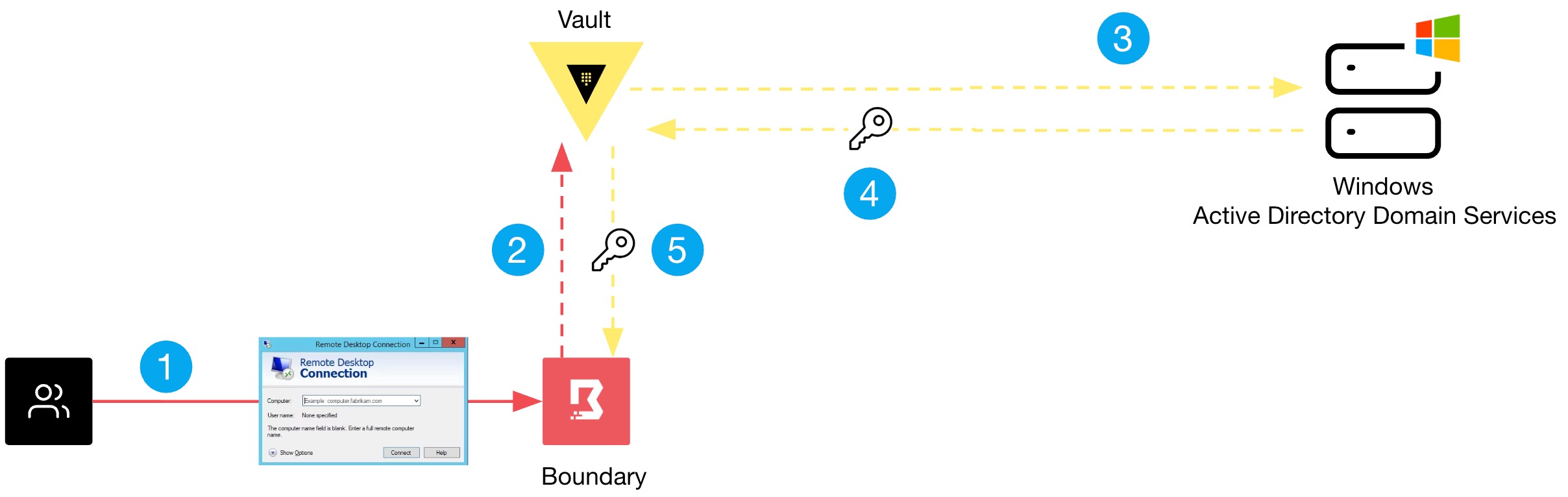
One of Boundary’s most powerful features is its ability to manage credentials for the user. When a user requests access to a Windows machine via RDP, Boundary can automatically fetch a dynamic password from Vault, inject it into the session, and allow the user to log in without ever knowing the secret. This removes the temptation to reuse or share credentials. Even if the session is recorded, the credential remains hidden. After the session ends, the password is revoked. This transparent credential handling dramatically reduces the risk of exposure, especially for privileged access.
8. Vault’s Dynamic Secrets for Windows Machines
Vault’s Active Directory or LDAP secret engines can generate temporary user accounts or rotate existing passwords on a schedule. For Windows environments, this means service accounts and local admin passwords can be short-lived. When an administrator needs to access a server, Vault creates a unique password for that specific session. No more shared admin accounts. The password automatically expires after a configurable time, or immediately after the session ends. This tightly integrates with Boundary, providing a seamless flow: user authenticates to Boundary, Boundary requests a credential from Vault, and the user accesses the target without ever touching a static secret.
9. Practical Steps to Test This Integration
To see the benefits firsthand, you can set up Boundary and Vault in a test environment. Start by deploying Vault and enabling the AD or LDAP secrets engine. Configure a role that generates temporary credentials. Then install Boundary and define targets for your Windows machines. Connect Boundary to Vault as a credential store. Finally, create a session recording policy to audit all access. Once configured, users only need to authenticate to Boundary—they then select the target (e.g., a specific Windows server) and Boundary automatically handles credential injection. This test proves how both credentials and access are locked down.
10. The Payoff: Reduced Risk for CISO and DevOps Teams
Adopting Boundary and Vault transforms Windows security. CISO teams gain full audit trails of who accessed what, when, and for how long—eliminating shared account blind spots. DevOps teams can automate credential rotation without manual overhead. The risk of lateral movement drops because users never get a network-level foothold. And because credentials are ephemeral, even if one is intercepted, it’s useless within minutes. This model aligns with zero-trust principles and addresses the two most persistent weaknesses in Windows environments: static credentials and broad network access.
In summary, the combination of Boundary and Vault provides a pragmatic, scalable path to eliminate credential exposure and enforce least-privilege access. By moving from static secrets and VPN-based connectivity to dynamic, identity-based access, organizations can significantly reduce their attack surface. The days of shared admin passwords and network-wide access are numbered—embrace this new model and take control of your Windows security.