Quick Facts
- Category: Technology
- Published: 2026-05-02 12:43:14
- React Native 0.82: A Major Milestone for Mobile Development
- The Surprising Origin of AmazonBasics Batteries
- Frame Generation Critics Miss the Big Picture: Why Razor-Thin Performance Gains Are the New Reality
- Decoding Bitcoin's Military Utility: A Guide to Cyber Power Projection
- Python 3.15 Alpha 1 Released: A First Look at Upcoming Features
With Ubuntu 26.04 LTS, Canonical has streamlined the way you manage Ubuntu Pro by integrating it directly into the Security Center app, replacing the older Software & Updates utility. This change aims to simplify the enrollment and configuration process, offering a cleaner interface with clearer explanations. Below, we answer the most common questions about enabling and using Ubuntu Pro in the new Security Center.
1. Where is Ubuntu Pro now configured in Ubuntu 26.04 LTS?
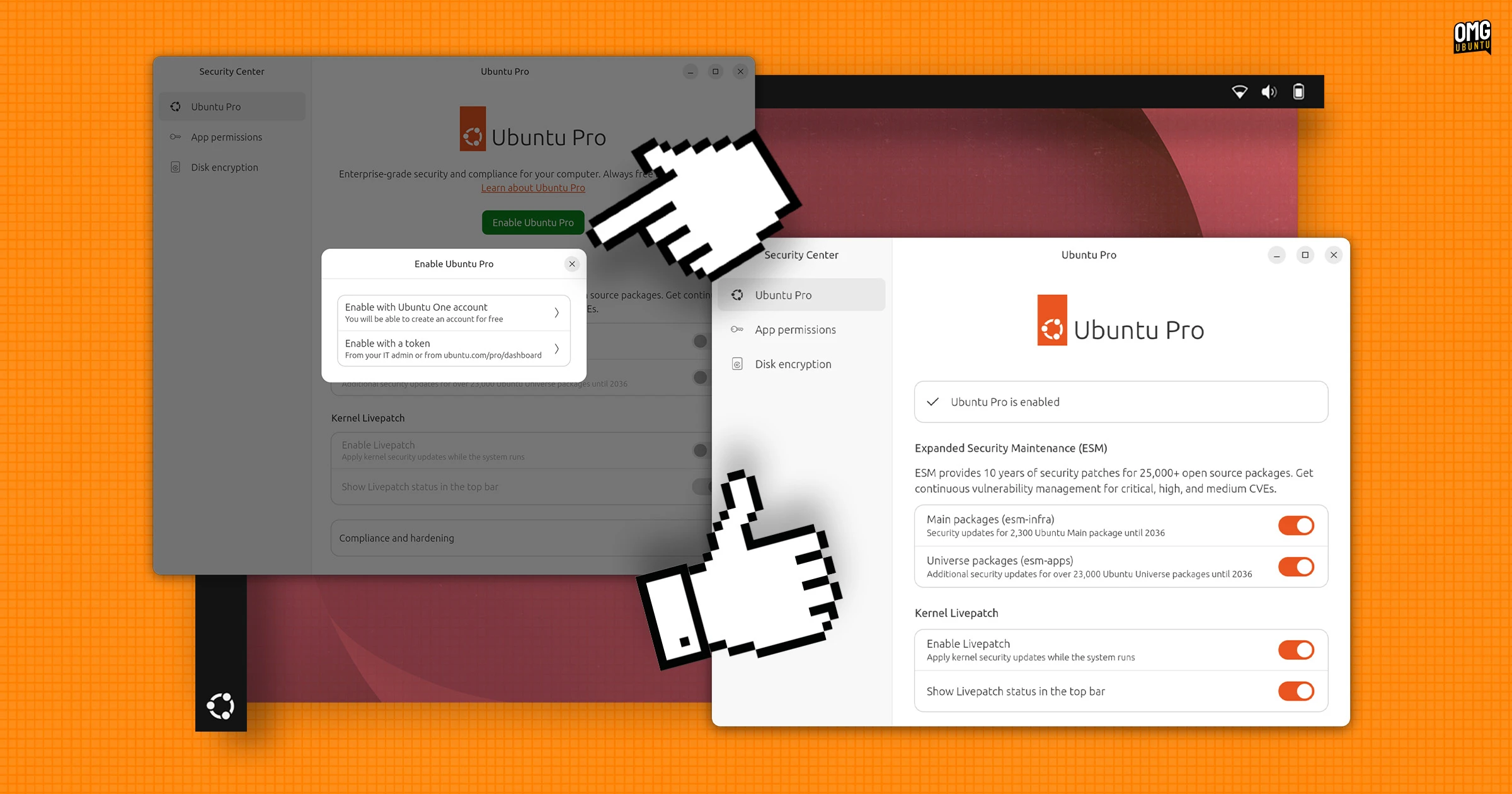
In Ubuntu 26.04 LTS, the Software & Updates utility has been removed from the default installation. All Ubuntu Pro-related settings have been moved to the Security Center application. You can find it by opening the system menu and selecting the Security Center icon, or by searching for "Security" in the Activities overview. Once inside, you'll see a dedicated Ubuntu Pro section, which houses all subscription management options, including enrollment, plan details, and service toggles. This consolidation makes it easier to manage security and subscription settings in one place, rather than jumping between multiple utilities.

2. How does the new Ubuntu Pro setup differ from the old method using Software & Updates?
The old method required navigating to Software & Updates > Ubuntu Pro tab, where options were presented in a cramped, dense layout. The new Security Center approach offers a significantly improved user interface: the settings are more spread out, with ample white space and concise explanations next to each toggle and option. This reduces confusion and helps users understand what each setting does. Enrollment itself has also been streamlined — you no longer need to leave the application to complete the setup. The overall experience feels more intuitive and modern, reflecting Canonical's focus on usability without sacrificing functionality.
3. Is Ubuntu Pro free, and what are the limitations?
Yes, Ubuntu Pro is free for personal use on up to five devices. This free tier includes access to security patches for over 23,000 packages, plus critical updates for 10 years. For businesses, enterprises, or anyone managing a larger fleet of Ubuntu installs, a paid subscription is required. Paid plans offer additional features like Landscape fleet management, compliance tooling, and priority support. The free tier covers individual users and small deployments, making it an excellent option for home labs and personal projects. To use it on more than five machines, you'll need to purchase a subscription through Canonical's store.
4. How do I enroll my Ubuntu device in Ubuntu Pro via Security Center?
Enrolling is straightforward. Open the Security Center, navigate to the Ubuntu Pro section, and click the “Enable Ubuntu Pro” button. You'll be prompted to sign in with your Ubuntu One account (create one if you don't have it). After signing in, you'll be asked to attach either a free token (for personal use) or a paid subscription token. If you're eligible for the free tier, the token is automatically generated; otherwise, you can paste a token from your subscription. Once validated, the service activates immediately. The entire process takes less than a minute and requires no terminal commands or manual file edits.
5. What improvements does the Security Center offer for managing Ubuntu Pro settings?
Apart from the cleaner layout, the Security Center provides real-time status indicators — you can see at a glance whether Ubuntu Pro is active, how many devices are attached to your subscription, and when the next security update is due. The explanations next to each setting are written in plain language, helping newcomers understand terms like “ESM Infra” or “Livepatch”. Additionally, the new interface allows you to manage multiple machines from one console if you link your Ubuntu One account. Logs and alerts are also integrated, so you don’t need separate apps to monitor security compliance.
6. Can I still access the old Software & Updates utility in Ubuntu 26.04 LTS?
The Software & Updates utility is no longer included in the default installation of Ubuntu 26.04 LTS. However, if you have an older system that was upgraded rather than clean-installed, you may still find it present. Canonical has not completely removed the package from the repositories — you can manually install it via sudo apt install software-properties-gtk. But for Ubuntu Pro management, the Security Center is the recommended and supported method. The old tool will likely become deprecated in future releases, so it's best to transition to the new workflow.